
Articulation Skills
Articulation skills operate objects with joints, such as doors, drawers, microwaves, laptops, and knobs. They are all built on top of a keypoint-based planner (KPAMPlanner) that solves geometric constraints online to generate keyframe trajectories.
Available Articulation Skills
workflows/simbox/core/skills/
├── artpreplan.py   # Pre-plan for long-horizon tasks
├── open.py         # Open or pull articulated objects
├── close.py        # Close or push articulated objects
└── rotate.py # Rotate knobs / handles| Skill | Description | Use Cases |
|---|---|---|
artpreplan | Pre-plan / fake-plan for long-horizon tasks | Search for reasonable layouts before actual execution |
open | Open or pull articulated objects | Microwave doors, cabinet doors, laptop screens, drawers |
close | Close or push articulated objects | Push microwaves closed, fold laptops, push drawers |
rotate | Rotate knobs or handles | Twist oven knobs, turn handles |
Skill Roles
artpreplan.py: Performs a fake plan in long-horizon tasks. It uses KPAM to search for reasonable keyframes and layouts (e.g., door open angle, drawer position) without actually executing them. The results inform subsequent skills about feasible configurations.open.py: Opens articulated objects:- Horizontal opening: microwave doors, cabinet doors
- Vertical opening: laptop screens
- Pulling: drawers with handles
close.py: Closes articulated objects:- Horizontal closing: push microwave doors closed
- Vertical closing: fold laptop screens down
- Push closing: push drawers back in
rotate.py: Grabs and rotates knobs or rotary handles around a specified axis.
All skills share the same planner core (KPAMPlanner in workflows/simbox/solver/planner.py), inspired by GenSim2.
Core API
Below we use Close as the main example.
Code Example:
# Source: workflows/simbox/core/skills/close.py
from copy import deepcopy

import numpy as np
from core.skills.base_skill import BaseSkill, register_skill
from omegaconf import DictConfig
from omni.isaac.core.controllers import BaseController
from omni.isaac.core.robots.robot import Robot
from omni.isaac.core.tasks import BaseTask
from omni.isaac.core.utils.prims import get_prim_at_path
from omni.isaac.core.utils.transformations import get_relative_transform
from scipy.spatial.transform import Rotation as R
from solver.planner import KPAMPlanner


@register_skill
class Close(BaseSkill):
    def __init__(self, robot: Robot, controller: BaseController, task: BaseTask, cfg: DictConfig, *args, **kwargs):
        super().__init__()
        self.robot = robot
        self.controller = controller
        self.task = task
        self.stage = task.stage
        self.name = cfg["name"]
        art_obj_name = cfg["objects"][0]
        self.skill_cfg = cfg
        self.art_obj = task.objects[art_obj_name]
        self.planner_setting = cfg["planner_setting"]
        self.contact_pose_index = self.planner_setting["contact_pose_index"]
        self.success_threshold = self.planner_setting["success_threshold"]
        self.update_art_joint = self.planner_setting.get("update_art_joint", False)
        if kwargs:
            self.world = kwargs["world"]
            self.draw = kwargs["draw"]
        self.manip_list = []

        if self.skill_cfg.get("obj_info_path", None):
            self.art_obj.update_articulated_info(self.skill_cfg["obj_info_path"])

        lr_arm = "left" if "left" in self.controller.robot_file else "right"
        self.fingers_link_contact_view = task.artcontact_views[robot.name][lr_arm][art_obj_name + "_fingers_link"]
        self.fingers_base_contact_view = task.artcontact_views[robot.name][lr_arm][art_obj_name + "_fingers_base"]
        self.forbid_collision_contact_view = task.artcontact_views[robot.name][lr_arm][
            art_obj_name + "_forbid_collision"
        ]
        self.collision_valid = True
        self.process_valid = True

    def setup_kpam(self):
        self.planner = KPAMPlanner(
            env=self.world,
            robot=self.robot,
            object=self.art_obj,
            cfg_path=self.planner_setting,
            controller=self.controller,
            draw_points=self.draw,
            stage=self.stage,
        )

    def simple_generate_manip_cmds(self):
        if self.skill_cfg.get("obj_info_path", None):
            self.art_obj.update_articulated_info(self.skill_cfg["obj_info_path"])

        self.setup_kpam()
        traj_keyframes, sample_times = self.planner.get_keypose()
        if len(traj_keyframes) == 0 and len(sample_times) == 0:
            print("No keyframes found, return empty manip_list")
            self.manip_list = []
            return

        T_world_base = get_relative_transform(
            get_prim_at_path(self.robot.base_path), get_prim_at_path(self.task.root_prim_path)
        )
        self.traj_keyframes = traj_keyframes
        self.sample_times = sample_times
        manip_list = []

        p_base_ee_cur, q_base_ee_cur = self.controller.get_ee_pose()
        ignore_substring = deepcopy(self.controller.ignore_substring + self.skill_cfg.get("ignore_substring", []))
        cmd = (
            p_base_ee_cur,
            q_base_ee_cur,
            "update_specific",
            {"ignore_substring": ignore_substring, "reference_prim_path": self.controller.reference_prim_path},
        )
        manip_list.append(cmd)

        for i in range(len(self.traj_keyframes)):
            p_base_ee_tgt = self.traj_keyframes[i][:3, 3]
            q_base_ee_tgt = R.from_matrix(self.traj_keyframes[i][:3, :3]).as_quat(scalar_first=True)
            cmd = (p_base_ee_tgt, q_base_ee_tgt, "close_gripper", {})
            manip_list.append(cmd)

            if i == self.contact_pose_index - 1:
                p_base_ee = self.traj_keyframes[i][:3, 3]
                q_base_ee = R.from_matrix(self.traj_keyframes[i][:3, :3]).as_quat(scalar_first=True)
                ignore_substring = deepcopy(
                    self.controller.ignore_substring + self.skill_cfg.get("ignore_substring", [])
                )
                parent_name = self.art_obj.prim_path.split("/")[-2]
                ignore_substring.append(parent_name)
                cmd = (
                    p_base_ee,
                    q_base_ee,
                    "update_specific",
                    {"ignore_substring": ignore_substring, "reference_prim_path": self.controller.reference_prim_path},
                )
                manip_list.append(cmd)
        self.manip_list = manip_list

    def update(self):
        curr_joint_p = self.art_obj._articulation_view.get_joint_positions()[:, self.art_obj.object_joint_index]
        if self.update_art_joint and self.is_success():
            self.art_obj._articulation_view.set_joint_position_targets(
                positions=curr_joint_p, joint_indices=self.art_obj.object_joint_index
            )

    def is_success(self):
        contact = self.get_contact()

        if self.skill_cfg.get("collision_valid", True):
            self.collision_valid = (
                self.collision_valid
                and len(contact["forbid_collision"]["forbid_collision_contact_indices"]) == 0
                and len(contact["fingers_base"]["fingers_base_contact_indices"]) == 0
            )
        if self.skill_cfg.get("process_valid", True):
            self.process_valid = np.max(np.abs(self.robot.get_joints_state().velocities)) < 5 and (
                np.max(np.abs(self.art_obj.get_linear_velocity())) < 5
            )

        curr_joint_p = self.art_obj._articulation_view.get_joint_positions()[:, self.art_obj.object_joint_index]
return np.abs(curr_joint_p) <= self.success_threshold and self.collision_valid and self.process_valid__init__(self, robot, controller, task, cfg, *args, **kwargs)
Initialize the close skill and bind it to a specific articulated object.
Parameters:
- robot (Robot): Robot instance.
- controller (BaseController): Motion controller.
- task (BaseTask): Task containing scene objects.
- cfg (DictConfig): Skill configuration from YAML.
Key Operations:
- Extract articulated object from
cfg["objects"][0] - Load planner settings (
contact_pose_index,success_threshold) - Initialize contact views for collision monitoring
- Load articulation info from
obj_info_pathif provided
setup_kpam(self)
Initialize the KPAM planner with world, robot, object, and configuration.
KPAM Planner Components:
- env: Simulation world
- robot: Robot instance
- object: Articulated object
- cfg_path: Planner configuration (constraints, solver options)
- controller: Motion controller
- stage: USD stage
simple_generate_manip_cmds(self)
Generate manipulation commands by solving constraints.
Steps:
- Setup KPAM: Initialize planner with current world state
- Get keyframes:
traj_keyframes, sample_times = self.planner.get_keypose() - Build manip_list:
- Update collision settings
- For each keyframe, add
close_grippercommand - Before contact pose, update collision filters to ignore parent link
Gripper Behavior:
- Close skill: Gripper remains closed throughout trajectory (pushing motion)
- Open skill: Gripper is open before contact, closes at contact point, then pulls
update(self)
Update articulation joint targets during execution.
When Enabled:
If update_art_joint is True and skill succeeds, the current joint position is written back as the target. This "locks in" the closed state for subsequent skills.
is_success(self)
Check if the close operation succeeded.
Success Conditions:
- Collision validity: No forbidden collisions, no palm contacts
- Process validity: Velocities within limits (< 5)
- Joint position:
|curr_joint_p| <= success_threshold(near closed state)
Returns:
- bool:
Trueif all conditions satisfied
KPAM Planner: Constraint-Based Trajectory Generation
The KPAMPlanner solves geometric constraints defined in the task YAML to generate keyframe trajectories. The solver code is in:
workflows/simbox/solver/planner.pyworkflows/simbox/solver/planner_utils.py
Keypoint Annotation
Before defining constraints, keypoints must be annotated on both the robot gripper and the articulated object.
Robot Gripper Keypoints
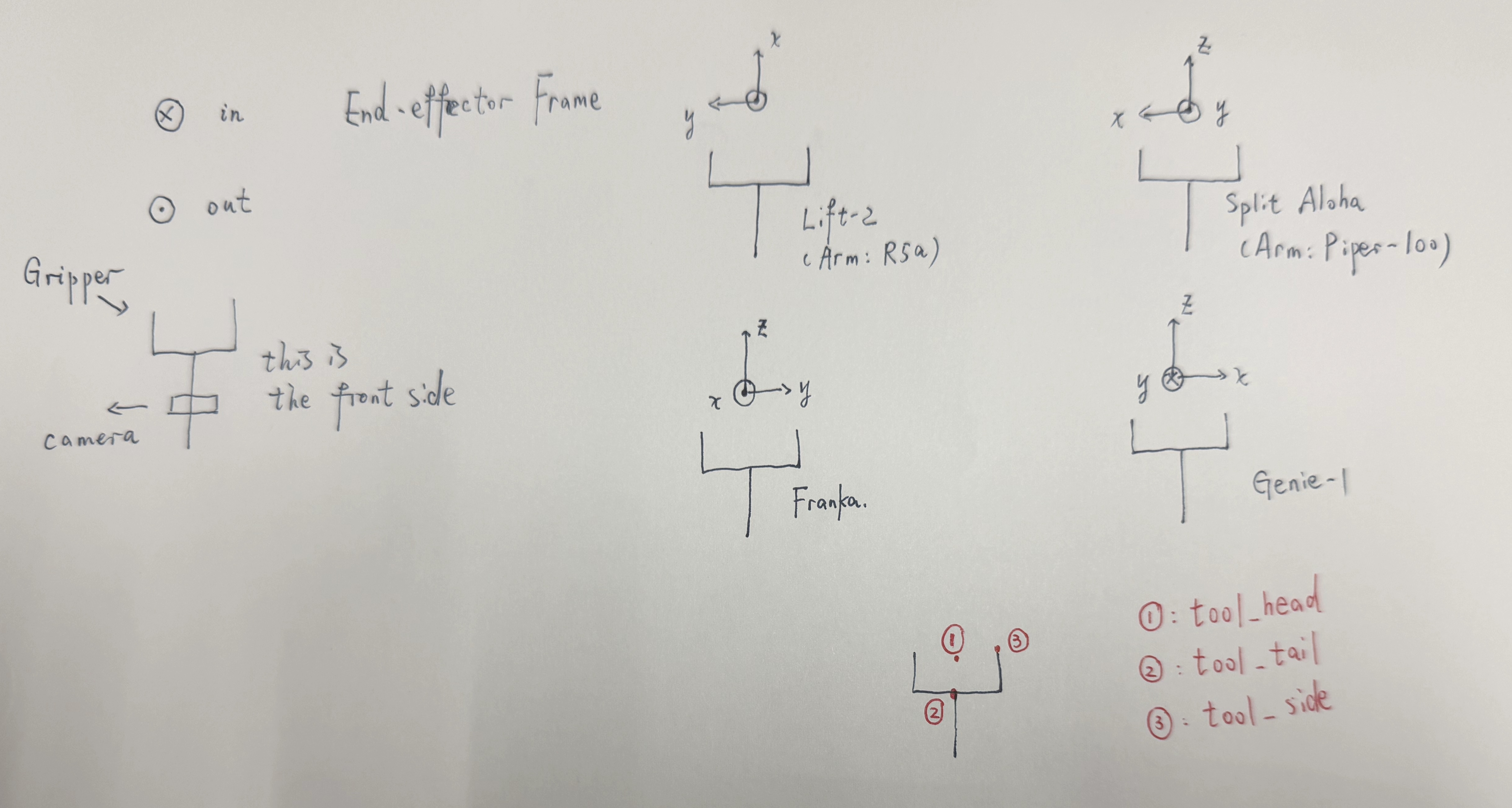
Defined in robot YAML under fl_gripper_keypoints / fr_gripper_keypoints (see Robots):
- tool_head (list): TCP position (fingertip center).
- tool_tail (list): Gripper base position.
- tool_side (list): Side fingertip position.
Articulated Object Keypoints
Annotated in the object's articulation info file. See Assets - Articulated Objects for details.
Common keypoints:
articulated_object_head— One end of the movable partarticulated_object_tail— Other end of the movable partlink0_contact_axis— Axis direction for contact
Constraint Types
Users define constraints in the task YAML under planner_setting.constraint_list. The planner solves these constraints to find valid keyframe poses.
Point-to-Point Constraint
- keypoint_name: tool_head
  target_keypoint_name: articulated_object_head
  tolerance: 0.0001
name: fingers_contact_with_link0- keypoint_name: tool_head Effect: Enforces that
keypoint_name(tool_head on gripper) andtarget_keypoint_name(articulated_object_head on object) are withintolerancedistance. Used to ensure gripper contacts the object.
Keypoints Vector Parallelism
- axis_from_keypoint_name: tool_head
  axis_to_keypoint_name: tool_side
  cross_target_axis1_from_keypoint_name: articulated_object_head
  cross_target_axis1_to_keypoint_name: articulated_object_tail
  target_axis: link0_contact_axis
  target_axis_frame: object
  tolerance: 0.005
  target_inner_product: -1
  type: frame_axis_parallel
name: hand_parallel_to_link0_edge_doorEffect: Enforces parallelism between two vectors:
- Gripper vector:
axis_from_keypoint_name → axis_to_keypoint_name(heretool_head → tool_side) - Object vector:
cross_target_axis1_from_keypoint_name → cross_target_axis1_to_keypoint_name(herearticulated_object_head → articulated_object_tail)
The target_inner_product specifies the desired alignment with tolerance:
-1: Vectors should be anti-parallel (opposite direction)1: Vectors should be parallel (same direction)
Parallelism with Cross Product
- axis_from_keypoint_name: tool_head
  axis_to_keypoint_name: tool_tail
  cross_target_axis1_from_keypoint_name: articulated_object_head
  cross_target_axis1_to_keypoint_name: articulated_object_tail
  target_axis: link0_contact_axis
  target_axis_frame: object
  tolerance: 0.005
  target_inner_product: 0.7
  type: frame_axis_parallel
name: fingers_orthogonal_to_link0Effect: Enforces parallelism between two vectors:
Gripper vector:
axis_from_keypoint_name → axis_to_keypoint_name(heretool_head → tool_tail, the approach direction)Computed object vector: Cross product of:
(cross_target_axis1_from_keypoint_name → cross_target_axis1_to_keypoint_name)(herearticulated_object_head → articulated_object_tail)target_axis(herelink0_contact_axis)
The target_inner_product specifies the desired dot product between these two vectors:
1.0: Parallel (same direction)-1.0: Anti-parallel (opposite direction)0.0: Perpendicular0.7: At an angle (approximately 45°)
In this example, target_inner_product: 0.7 enforces that the gripper's approach direction is at an angle to the door surface, which is often needed for stable grasping during manipulation.
Vector Alignment Constraint (simple)
- axis_from_keypoint_name: tool_head
  axis_to_keypoint_name: tool_side
  target_axis: object_link0_move_axis
  target_axis_frame: object
  tolerance: 0.0005
  target_inner_product: -1
  type: frame_axis_parallel
name: hand_parallel_to_link0_edgeEffect: Enforces that the gripper vector tool_head → tool_side aligns directly with target_axis (here object_link0_move_axis), without any cross product calculation.
This is used when the target axis is already known (e.g., the pulling direction of a drawer) and you want the gripper to align with it.
How Constraints Are Solved
- Keypoint lookup: Planner reads all keypoint positions from robot and object
- Constraint evaluation: Each constraint computes a cost based on current EE pose
- Optimization: Solver minimizes total cost to find valid keyframe poses
- Trajectory generation: Valid poses become waypoints in
manip_list
Configuration Reference
- objects (list, default: required):
[articulated_object_name]. - obj_info_path (string, default:
None): Path to articulation info YAML. - planner_setting.contact_pose_index (int, default: required): Keyframe index where gripper contacts object.
- planner_setting.success_threshold (float, default: required): Joint displacement threshold for success.
- planner_setting.update_art_joint (bool, default:
False): Update articulation joint targets on success. - planner_setting.constraint_list (list, default: required): List of constraint definitions.
- ignore_substring (list, default:
[]): Collision filter substrings.
References
- GenSim2 — Scaling Robot Data Generation with Multi-modal and Reasoning LLMs. The KPAM planner design is inspired by the keypoint-based manipulation approach in GenSim2.