
Workflows
Workflows are the interfaces designed by the engine to manipulate the synthetic data pipeline. To understand workflows, you first need a basic understanding of the engine's overall architecture.
Overall Architecture
The framework of the engine is shown in the figure:
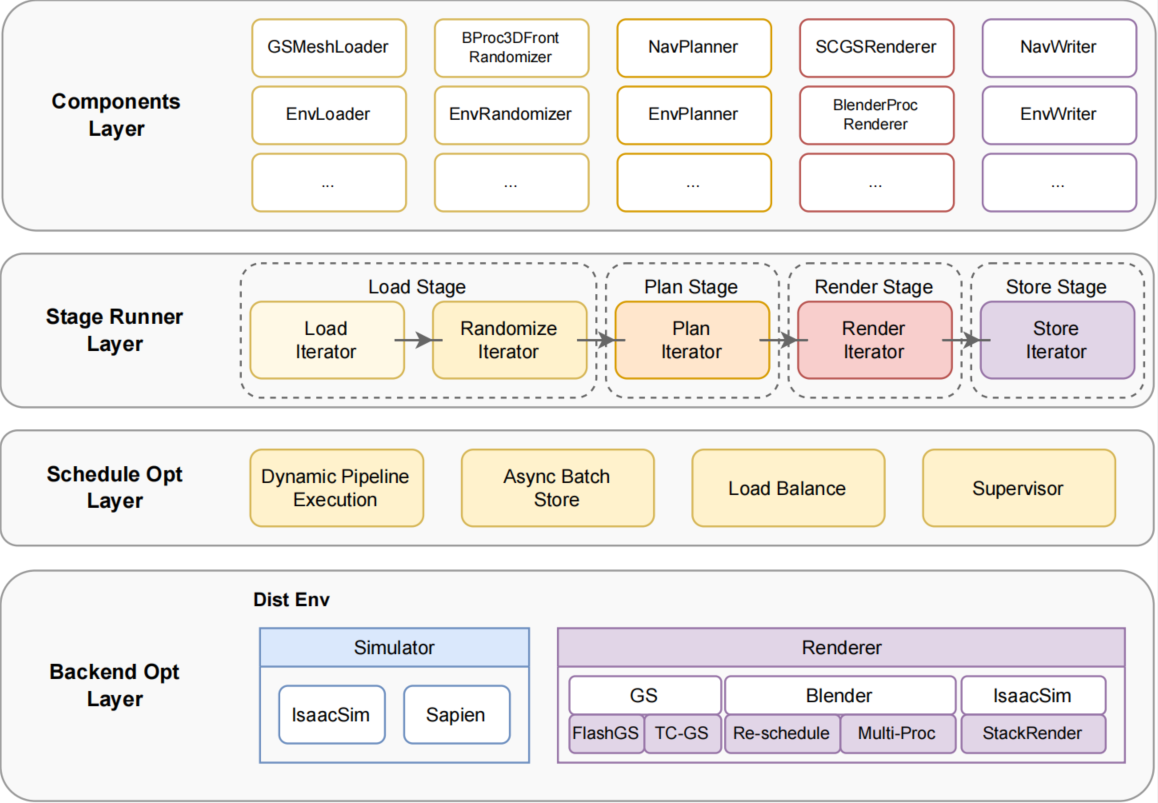
Above the optimization layer, the engine provides designs related to the Stage Runner Layer and the Components Layer.
In the Stage Runner Layer, the standardized lifecycle of data production is defined, namely Load → Plan → Render → Store.
Based on iterator execution flow, a strict set of abstract base class interfaces is designed, unifying the workflow control of all tasks to ensure that different components extended based on the same interface can collaborate seamlessly.
For manipulating the data generation pipeline, they are integrated through Env series components combined with workflows. Its core extension principle is based on standardized component interfaces and lifecycle design:
| Abstract Class | Derived Class | Core Interface | Functional Duty |
|---|---|---|---|
BaseLoader | EnvLoader | load_asset() | Resource loading and validation |
BaseRandomizer | EnvRandomizer | randomize_scene() | Domain randomization of the scene |
BasePlanner | EnvPlanner | generate_sequence() | Generate trajectory or action sequence |
BaseRenderer | EnvRenderer | generate_obs() | Synthesize multimodal visual data |
BaseWriter | EnvWriter | flush_to_disk() | Serialized storage |
Workflow Base Class and Interfaces
Based on the Env component architecture, a workflow base class NimbusWorkFlow is defined in workflows/base.py, with its core API as follows:
Workflow Interface List
The workflow base class NimbusWorkFlow provides a complete set of interfaces. The table below lists all interfaces and their types:
| Method | Return | Calling Component | Type | Description |
|---|---|---|---|---|
parse_task_cfgs(task_cfg_path) | list | EnvLoader | ✓ Core | Parse task configuration files, return task list |
get_task_name() | str | EnvLoader | ✓ Core | Get the name of the currently executing task |
reset(need_preload) | - | EnvLoader | ✓ Core | Reset environment to initial task state |
randomization(layout_path=None) | bool | EnvRandomizer | ✓ Core | Execute domain randomization |
generate_seq() | list | EnvPlanner | ✓ Core | Generate action sequence/trajectory |
seq_replay(sequence) | int | EnvRenderer | ✓ Core | Replay sequence and generate visual data |
save(save_path) | int | EnvWriter | ✓ Core | Save all data (trajectory + visual data) |
save_seq(save_path) | int | EnvWriter | Optional | Only save trajectory, do not save visual data |
recover_seq(seq_path) | list | EnvReader | Optional | Recover trajectory from disk |
generate_seq_with_obs() | int | EnvPlanWithRender | Optional | Generate sequence with visual data |
dump_plan_info() | bytes | EnvDumper | Optional | Serialize planning information |
dedump_plan_info(ser_obj) | object | Dedumper | Optional | Deserialize planning information |
randomization_from_mem(data) | bool | EnvRandomizer | Optional | Randomize from in-memory data |
recover_seq_from_mem(data) | list | EnvReader | Optional | Recover sequence from in-memory data |
Interface Type Description:
| Type | Description |
|---|---|
| ✓ Core Interface | Abstract methods that must be overridden in all workflow implementations |
| Optional | Implemented on-demand based on execution mode |
Execution Modes
Plan with Render Mode
Execute planning and rendering at the same time within a single stage to generate complete trajectories and visual data. Corresponding configuration template: de_plan_and_render_template.yaml
Lifecycle Flow: Involved components and corresponding workflow interfaces:
EnvLoader <-> get_task_name() → init_task() → reset()
EnvRandomizer <-> randomization()
EnvPlanWithRender <-> generate_seq_with_obs()
EnvWriter <-> save()Application Scenario: Fluid simulation tasks
Plan and Render Mode
Execute the planning and rendering stages sequentially. Corresponding configuration template: de_plan_and_render_template.yaml
Lifecycle Flow: Involved components and corresponding workflow interfaces:
EnvLoader <-> get_task_name() → init_task() → reset()
EnvRandomizer <-> randomization()
EnvPlanner <-> generate_seq()
EnvRenderer <-> seq_replay(sequence)
EnvWriter <-> save()Application Scenario: Algorithm debugging, prototype validation
Pipeline Mode (Distributed Pipeline)
Decouple planning and rendering stages, supporting custom dynamic pipeline scheduling. Corresponding configuration template: de_pipe_template.yaml
Plan Process Lifecycle: Involved components and corresponding workflow interfaces:
EnvLoader <-> get_task_name() → init_task() → reset()
EnvRandomizer <-> randomization()
EnvPlanner <-> generate_seq()
EnvDumper <-> dump_plan_info()Render Process Lifecycle: Involved components and corresponding workflow interfaces:
Dedumper
EnvLoader <-> get_task_name() → init_task() → reset() → dedump_plan_info(ser_obj)
EnvRandomizer <-> randomization_from_mem(data)
EnvReader <-> recover_seq_from_mem(data)
EnvRenderer <-> seq_replay(sequence)
EnvWriter <-> save()Application Scenario: Large-scale distributed data generation
Plan Only Mode
Generate only trajectory data, do not perform rendering operations; can reduce computational resource occupation.
Lifecycle Flow: Involved components and corresponding workflow interfaces:
EnvLoader <-> get_task_name() → init_task() → reset()
EnvRandomizer <-> randomization()
EnvPlanner <-> generate_seq()
EnvWriter <-> save()Application Scenario: Trajectory pre-generation, cooperate with Render Only mode to generate diversified background and material videos
Render Only Mode
Perform visual rendering on previously generated trajectory data.
Lifecycle Flow: Involved components and corresponding workflow interfaces:
EnvLoader <-> get_task_name() → init_task() → reset()
EnvRandomizer <-> randomization(layout_path)
EnvReader <-> recover_seq()
EnvRenderer <-> seq_replay(sequence)
EnvWriter <-> save()Application Scenario: Cooperate with Plan Only mode to generate diversified background and material videos, CI correctness validation
SimBox Workflow Implementation
Workflow Registration
In workflows/init.py, register workflow extensions:
def import_extensions(workflow_type):
    if workflow_type == "SimBoxDualWorkFlow":
        import workflows.simbox_dual_workflow
    else:
raise ValueError(f"Unsupported workflow type: {workflow_type}")Workflow Definition
In workflows/simbox_dual_workflow.py, define the specific implementation:
@NimbusWorkFlow.register("SimBoxDualWorkFlow")
class SimBoxDualWorkFlow(NimbusWorkFlow):
    def __init__(
        self,
        world,
        task_cfg_path: str,
        scene_info: str = "dining_room_scene_info",
        random_seed: int = None,
    ):
...Workflow Architecture Design
The core component structure of the SimBox workflow is as follows:
SimBoxDualWorkFlow
 Task Module (task/banana.py)
   ├── SceneObject Object Management
   ├── Camera Configuration
   └── Region Definition
 Controller Module (controller/template_controller.py)
   ├── CuRobo Motion Planner
   └── Gripper Controller
 Skill Module (skill/pick.py, place.py, ...)
└── Atomic Operation UnitsRelated Documentation
- Controller Design - Robot motion planning and control
- Skill Development - Implementation and extension of manipulation skills
- Task Definition - Construction and configuration of simulation environments