
Extended benchmarks in InternNav#
This page provides specific tutorials about the usage of InternVLA-N1 for different benchmarks.
VL-LN Bench#
VL-LN Bench is a large-scale benchmark for Interactive Instance Goal Navigation. VL-LN Bench provides: (1) an automatically dialog-augmented trajectory generation pipeline, (2) a comprehensive evaluation protocol for training and assessing dialog-capable navigation models, and (3) the dataset and base model used in our experiments. For full details, see our paper and the project website.
On this page, we cover VL-LN Bench: how to run InternVLA-N1 on this benchmark and an overview of the VL-LN Bench data collection pipeline.
Abstract#
In most existing embodied navigation tasks, instructions are well-defined and unambiguous, such as instruction following and object searching. Under this idealized setting, agents are required solely to produce effective navigation outputs conditioned on vision and language inputs. However, real-world navigation instructions are often vague and ambiguous, requiring the agent to resolve uncertainty and infer user intent through active dialog. To address this gap, we propose Interactive Instance Goal Navigation (IIGN), a task that requires agents not only to generate navigation actions but also to produce language outputs via active dialog, thereby aligning more closely with practical settings. IIGN extends Instance Goal Navigation (IGN) by allowing agents to freely consult an oracle in natural language while navigating. Building on this task, we present the Vision Language-Language Navigation (VL-LN) benchmark, which provides a large-scale, automatically generated dataset and a comprehensive evaluation protocol for training and assessing dialog-enabled navigation models. VL-LN comprises over 41k long-horizon dialog-augmented trajectories for training and an automatic evaluation protocol with an oracle capable of responding to agent queries. Using this benchmark, we train a navigation model equipped with dialog capabilities and show that it achieves significant improvements over the baselines. Extensive experiments and analyses further demonstrate the effectiveness and reliability of VL-LN for advancing research on dialog-enabled embodied navigation.
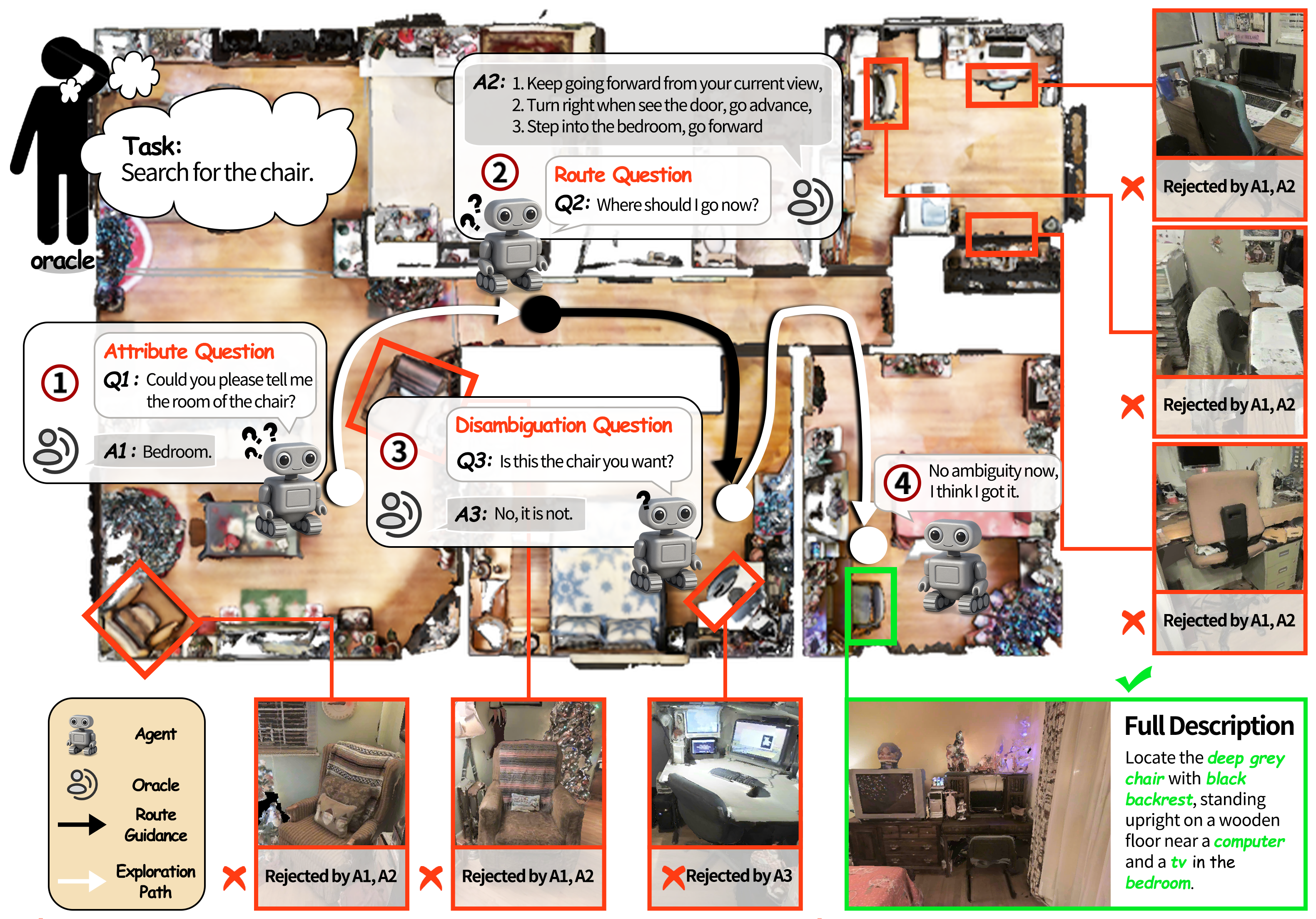
A case for the IIGN task. The oracle (top left) first gives a simple goal-oriented navigation instruction (“Search for the chair.”). The agent has to locate a specific instance of the given category (chair). The agent can ask three types of questions—attribute, route, and disambiguation—to progressively resolve ambiguity and locate the target (instance). The full description in the bottom right is the instruction given to the agent in the IGN task, which can locate the specific chair in this environment.
Evaluation#
Metrics#
VL-LN Bench reports standard navigation metrics (SR, SPL, OS, NE) and introduces Mean Success Progress (MSP) to measure dialog utility.
SR: Success Rate
SPL: Success Rate weighted by Path Length
OS: Oracle Success Rate
NE: Navigation Error
MSP: Mean Success Progress
Given a maximum dialog budget of (n) turns:
Let ( s_0 ) be the success rate without dialog.
Let ( s_i ) be the success rate with at most (i) dialog turns ((1 < i < n)).
$$ \mathrm{MSP}=\frac{1}{n}\sum_{i=1}^{n}(s_i-s_0) $$
MSP measures the average success improvement brought by dialog and favors gains achieved with fewer turns.
Methods#
We evaluate five baseline methods.
FBE: a greedy frontier-based exploration agent that repeatedly selects the nearest frontier; it detects the target instance using an open-vocabulary detector built on Grounded SAM 2.
VLFM: uses the official released version.
The following three baselines are initialized from Qwen2.5-VL-7B-Instruct and trained using the InternVLA-N1 recipe, with different data mixtures. All three include the InternVLA-N1 VLN data. For the detailed training configuration, please refer to this script.
VLLN-O: additionally uses object goal navigation data (23,774 trajectories).
VLLN-I: additionally uses instance goal navigation data without dialog (11,661 trajectories).
VLLN-D: additionally uses instance goal navigation data with dialog (11,661 trajectories).
Results#
IIGN and IGN use the same episode setup, but differ in how the goal is described. In IIGN, the instruction only specifies the target category (e.g., “Search for the chair.”). In contrast, IGN provides a fully disambiguating description that uniquely identifies the instance in the scene (e.g., “Locate the brown leather armchair with a smooth texture and curved shape, standing straight near the wooden desk and curtain. The armchair is in the resting room.”).
IIGN
Method |
SR↑ |
SPL↑ |
OS↑ |
NE↓ |
MSP↑ |
|---|---|---|---|---|---|
FBE |
8.4 |
4.74 |
25.2 |
11.84 |
– |
VLFM |
10.2 |
6.42 |
32.4 |
11.17 |
– |
VLLN-O |
14.8 |
10.36 |
47.0 |
8.91 |
– |
VLLN-I |
14.2 |
8.18 |
47.8 |
9.54 |
– |
VLLN-D |
20.2 |
13.07 |
56.8 |
8.84 |
2.76 |
IGN
Method |
SR↑ |
SPL↑ |
OS↑ |
NE↓ |
MSP↑ |
|---|---|---|---|---|---|
FBE |
7.4 |
4.45 |
33.4 |
11.78 |
– |
VLFM |
12.6 |
7.68 |
35.4 |
10.85 |
– |
VLLN-O |
5.6 |
4.24 |
25.2 |
10.76 |
– |
VLLN-I |
22.4 |
13.43 |
60.4 |
8.16 |
– |
VLLN-D |
25.0 |
15.59 |
58.8 |
7.99 |
2.16 |
Across both IIGN and IGN, VLLN-D achieves the best performance, highlighting the benefit of proactive querying—while still leaving substantial room for improvement. Based on our analysis of IIGN failure cases, we summarize the key remaining challenges:
Image–attribute alignment is the main bottleneck for both IGN and IIGN.
Questioning remains limited: the agent still struggles to reliably disambiguate the target instance from same-category distractors through dialog.
Citation#
@misc{huang2025vllnbenchlonghorizongoaloriented,
      title={VL-LN Bench: Towards Long-horizon Goal-oriented Navigation with Active Dialogs},
      author={Wensi Huang and Shaohao Zhu and Meng Wei and Jinming Xu and Xihui Liu and Hanqing Wang and Tai Wang and Feng Zhao and Jiangmiao Pang},
      year={2025},
      eprint={2512.22342},
      archivePrefix={arXiv},
      primaryClass={cs.RO},
      url={https://arxiv.org/abs/2512.22342},
}
Deployment Tutorial#
Here is a basic example of training and evaluating InternVLA-N1 on VL-LN Bench.
Step1. Dataset Preparation#
VL-LN Bench is built on Matterport3D (MP3D) Scene Dataset, so you need to download both the MP3D scene dataset and the VL-LN Bench dataset.
Scene Datasets
Download the MP3D Scene Dataset
This directory should point to VL-LN-Bench/, the root folder of the VL-LN Bench dataset (VL-LN Data). First, unzip all *.json.gz files under VL-LN-Bench/traj_data/. Then:
Place the VL-LN Base Model into
VL-LN-Bench/base_model/.Place the Matterport3D (MP3D) scene dataset into
VL-LN-Bench/scene_datasets/.
After setup, your folder structure should look like this:
VL-LN-Bench/
├── base_model/
│   └── iign/
├── raw_data/
│   └── mp3d/
│       ├── scene_summary/
│       ├── train/
│       │   ├── train_ign.json.gz
│       │   └── train_iign.json.gz
│       └── val_unseen/
│           ├── val_unseen_ign.json.gz
│           └── val_unseen_iign.json.gz
├── scene_datasets/
│   └── mp3d/
│       ├── 17DRP5sb8fy/
│       ├── 1LXtFkjw3qL/
│       ...
└── traj_data/
    ├── mp3d_split1/
    ├── mp3d_split2/
    └── mp3d_split3/
Step2. Environment Setup#
Here we set up the Python environment for VL-LN Bench and InternVLA-N1. If you’ve already installed the InternNav Habitat environment, you can skip these steps and only run the commands related to VL-LN Bench.
Get Code
git clone git@github.com:InternRobotics/VL-LN.git # code for data collection
git clone git@github.com:InternRobotics/InternNav.git # code for training and evaluation
Create Conda Environment
conda create -n vlln python=3.9 -y
conda activate vlln
Install Dependencies
conda install habitat-sim=0.2.4 withbullet headless -c conda-forge -c aihabitat
cd VL-LN
pip install -r requirements.txt
cd ../InternNav
pip install -e .
Step3. Guidance for Data Collection Pipeline#
This step is optional. You can either use our collected data for policy training, or follow this step to collect your own training data.
Prerequisites:
Get pointnav_weights.pth from VLFM
Arrange the Directory Structure Like This
VL-LN
├── dialog_generation/
├── images/
├── VL-LN-Bench/
│   ├── base_model/
│   ├── raw_data/
│   ├── scene_datasets/
│   ├── traj_data/
│   └── pointnav_weights.pth
...
Collect Trajectories
# If having slurm
sbatch generate_frontiers_dialog.sh

# Or directly run
python generate_frontiers_dialog.py \
    --task instance \
    --vocabulary hm3d \
    --scene_ids all \
    --shortest_path_threshold 0.1 \
    --target_detected_threshold 5 \
    --episodes_file_path VL-LN-Bench/raw_data/mp3d/train/train_iign.json.gz \
    --habitat_config_path dialog_generation/config/tasks/dialog_mp3d.yaml \
    --baseline_config_path dialog_generation/config/expertiments/gen_videos.yaml \
    --normal_category_path dialog_generation/normal_category.json \
    --pointnav_policy_path VL-LN-Bench/pointnav_weights.pth\
    --scene_summary_path VL-LN-Bench/raw_data/mp3d/scene_summary\
    --output_dir <PATH_TO_YOUR_OUTPUT_DIR> \
Step4. Guidance for Training and Evaluation#
Here we show how to train your own model for the IIGN task and evaluate it on VL-LN Bench.
Prerequisites
cd InternNav
# Link VL-LN Bench data into InternNav
mkdir projects && cd projects
ln -s /path/to/your/VL-LN-Bench ./VL-LN-Bench
Write your OpenAI API key to api_key.txt.
# Your final repo structure may look like
InternNav
├── assets/
├── internnav/
│   ├── habitat_vlln_extensions
│   │   ├── simple_npc
│   │   │   ├── api_key.txt
│   ... ... ...
...
├── projects
│   ├── VL-LN-Bench/
│   │   ├── base_model/
│   │   ├── raw_data/
│   │   ├── scene_datasets/
│   │   ├── traj_data/
... ...
Start Training
# Before running, please open this script and make sure
# the "llm" path points to the correct checkpoint on your machine.
sbatch ./scripts/train/qwenvl_train/train_system2_vlln.sh
After training, a checkpoint folder will be saved to checkpoints/InternVLA-N1-vlln/. You can then evaluate either your own checkpoint or our VLLN-D checkpoint. To switch the evaluated model, update model_path in scripts/eval/configs/habitat_dialog_cfg.py.
Start Evaluation
# If having slurm
sh ./scripts/eval/bash/srun_eval_dialog.sh

# Or directly run
python scripts/eval/eval.py \
  --config scripts/eval/configs/habitat_dialog_cfg.py
After running evaluation, you’ll get an output/ directory like this:
# Your final repo structure may look like:
output/
└── dialog/
    ├── vis_0/          # rendered evaluation videos for each episode
    ├── action/         # step-by-step model outputs (actions / dialogs) for each episode
    ├── progress.json   # detailed results for every episode
    └── result.json     # aggregated metrics over all evaluated episodes
Notes
Each
.txtfile underaction/logs what the agent did at every step. Lines may look like:0 <talk> Tell me the room of the flat-screen TV? living room4 <move> ←←←←The first number is the step index. The tag indicates whether it is an active dialog (<talk>) or a navigation action (<move>).
progress.jsonstores per-episode details, whileresult.jsonreports the average performance across all episodes inprogress.json, includingSR,SPL,OS,NE, andSTEP.